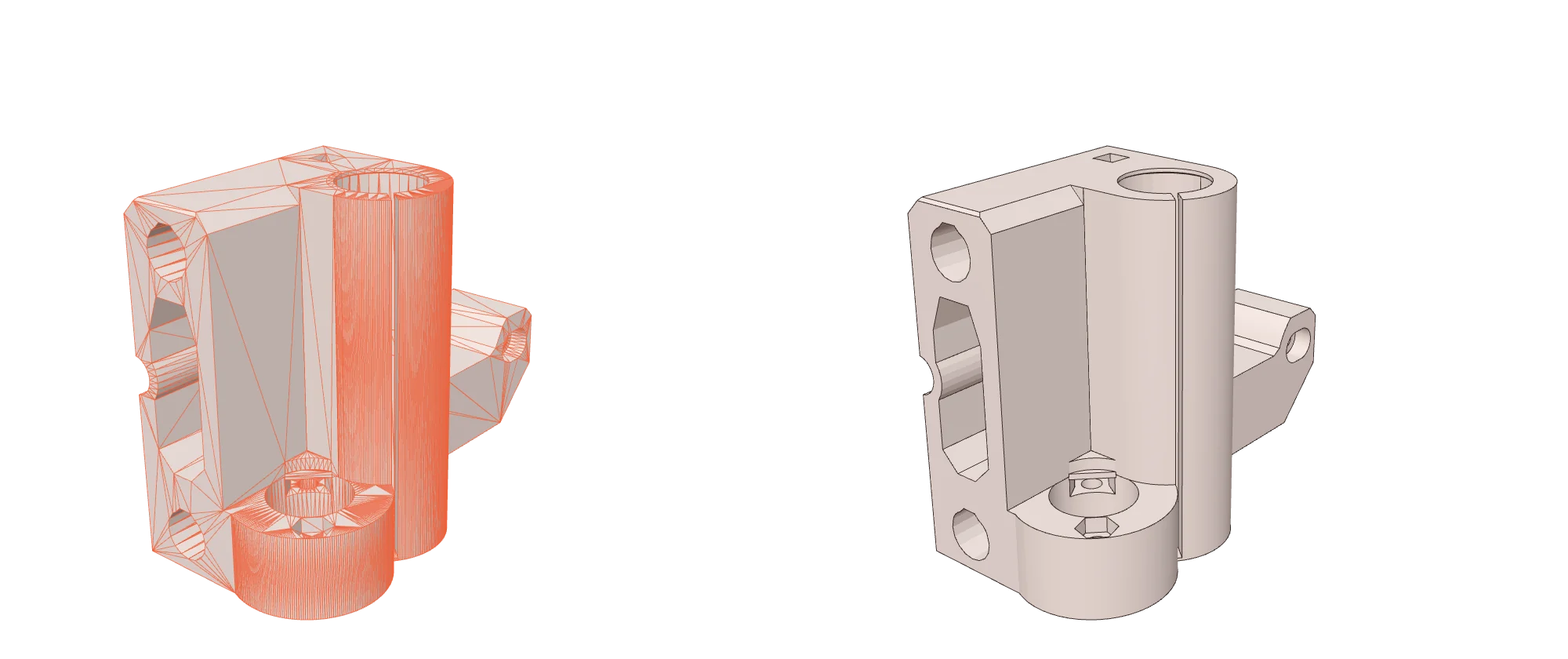
Turn a 3DM mesh into a STEP file with real CAD geometry. Flat faces, holes, cylinders and cones are recognised and rebuilt as true surfaces, so you can select, measure and edit them.
Real planes, cylinders and cones, not thousands of triangles
One valid solid that opens in any CAD program
Runs on your computer: nothing is uploaded
No file yet
Drop a 3DM file or
Files stay on your computer.
Done
How to convert 3DM to STEP
Add your 3DM file
Drop it on the converter above or click browse. It opens in your browser, so nothing is uploaded.
Check the format is STEP
STEP is already selected. You can switch to any other output from the menu.
Convert and download
Click Convert. Our engine rebuilds the CAD faces, checks the solid, then your STEP file is ready to download.
STL to STEP, done properly
A STEP file you can actually edit.
Other converters wrap every triangle as its own face. Open that in SolidWorks and you get thousands of fragments. We find the real shapes in your mesh and rebuild them, so holes are holes and walls are single faces.
3DM is the native file of Rhino, used widely in industrial, jewellery and architectural design. It stores NURBS surfaces, SubD objects, meshes and block instances.
STEP stores exact CAD geometry: true planes, cylinders, cones and freeform surfaces joined into solids. It is the standard way to move parts between CAD systems such as SolidWorks, Fusion 360, Inventor, CATIA and FreeCAD.
Full name
ISO 10303 (Standard for the Exchange of Product Data)
Rhino saves a display mesh for every surface it has shown in shaded view. We use those meshes. If a file was saved with "Save Small", open it in Rhino, switch to shaded view and save it again.
3DM files store triangles only, so most converters wrap each triangle as its own face. The STEP opens, but every hole is hundreds of slivers and you cannot fillet, measure or edit anything. We analyse the mesh first and rebuild the real shapes.
Mechanical parts convert best: brackets, enclosures, mounts, gears and anything designed in CAD. Organic shapes such as sculptures and scans have few flat or round areas, so they come out as many small flat faces. They are still a valid solid.
Units are kept as they are in the file. Most 3DM files from 3D printing are in millimetres, which is what CAD programs expect.
Complex parts can take up to a minute because the rebuilding runs on your own computer. The progress bar shows each stage.
Can I edit the STEP file in SolidWorks or Fusion 360?
Yes. The result is a solid with real faces. Holes come out as cylinders you can select and resize, and flat walls are single faces you can sketch on or extrude.
Why does my STEP file from other converters have thousands of faces?
Because they turn every triangle of the mesh into its own face. We detect the planes, cylinders, cones and spheres in your 3DM and rebuild those instead.
Will an organic or scanned model convert well?
It will convert into a valid solid, but freeform shapes have few flat or round areas, so the result is made of many small flat faces. CAD-designed parts give the cleanest results.
Are my files uploaded?
No. The conversion runs inside your browser, so your 3DM file never leaves your computer.
Is there a file size limit?
There is no upload limit because nothing is uploaded. Very large meshes (over about a million triangles) need a computer with plenty of memory.